Understanding GPUs: A Beginner’s Buying Guide for UAE & India
By Akhil·
Building or upgrading a PC can feel overwhelming, especially when it comes to choosing a GPU (Graphics Processing Unit). Many beginners wonder: “What is a GPU exactly, and do I really need a powerful one?” Whether you’re gaming at 1080p, editing videos, or just want smooth everyday performance, this guide breaks everything down simply for buyers in India and the UAE in 2026.
If you’re ready to explore actual models or full PC builds, head to our GPUs section for detailed specs and comparisons.
What is a GPU? Simple Explanation for Beginners
A GPU, often called a graphics card or video card, is a specialized processor designed to handle visual tasks quickly. While your CPU (central processing unit) manages general computing like running programs and calculations one at a time, the GPU excels at doing thousands of similar calculations simultaneously — perfect for rendering images, videos, and 3D graphics.
Think of it like this: The CPU is the brain that plans and coordinates, while the GPU is a team of hundreds or thousands of small workers handling repetitive heavy lifting, such as drawing every pixel on your screen or calculating lighting in a game.
Beyond gaming, GPUs now power video editing, 3D rendering, AI tasks, and even cryptocurrency mining. In short, a good GPU makes your screen look smooth, sharp, and responsive.
Why Does the GPU Matter When Buying or Building a PC?
Your GPU determines how well your PC handles:
Gaming (frame rates, graphics settings, ray tracing)
Video playback and streaming
Content creation (photo/video editing, 3D modeling)
Everyday multitasking with multiple browser tabs or apps
A weak or integrated GPU (built into the CPU) works for basic tasks like browsing or office work, but for modern games or creative software, a dedicated graphics card is essential. In India and the UAE, where electricity costs and heat can be concerns, choosing an efficient GPU also helps keep power bills and temperatures in check.
Key GPU Specs Explained (What to Look For)
Here are the most important terms beginners should understand:
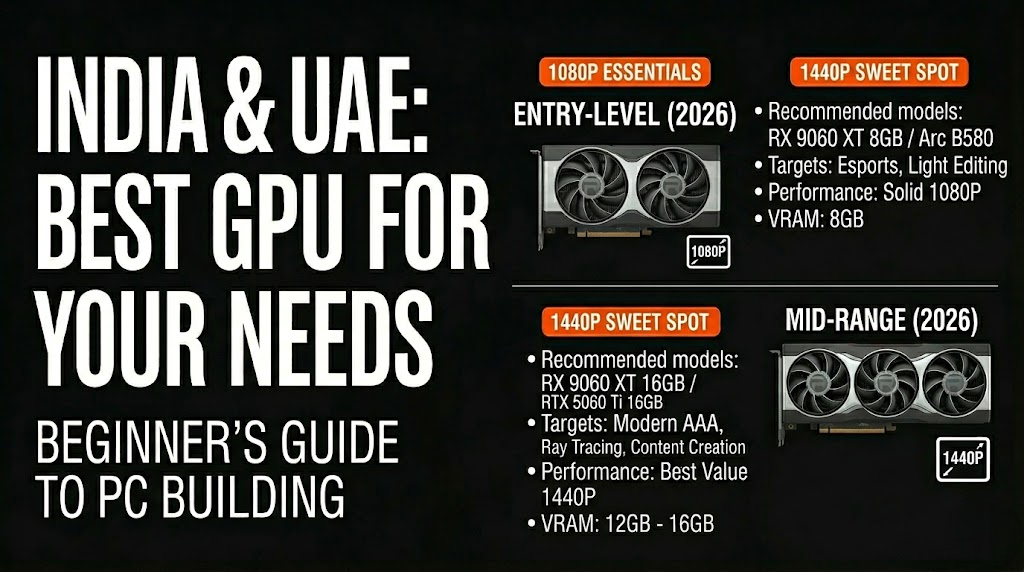
VRAM (Video Memory): Like RAM but for the GPU. More VRAM (8GB+) helps with higher resolutions and detailed textures. 12GB–16GB is ideal for 1440p in 2026; 8GB works for 1080p.
Cores / CUDA Cores / Stream Processors: More cores generally mean better performance. NVIDIA uses CUDA cores, AMD uses Stream Processors.
Clock Speed: Measured in MHz or GHz — higher speeds deliver faster processing.
Power Consumption (TDP): Measured in watts. Higher TDP cards need a stronger power supply and better cooling.
Ray Tracing & Upscaling: NVIDIA’s DLSS and AMD’s FSR use AI to boost frame rates while keeping visuals sharp. Ray tracing creates realistic lighting and reflections.
Resolution Target: 1080p (Full HD) is easiest on the GPU; 1440p needs more power; 4K demands high-end cards.
Always match your GPU to your monitor’s resolution and refresh rate for the best experience.
NVIDIA vs AMD vs Intel: Which Brand Should You Choose?
NVIDIA (GeForce RTX series): Best for ray tracing, DLSS upscaling, and features like Frame Generation. Excellent driver support and widely available in India/UAE. Popular in 2026: RTX 5060, 5070 Ti, and higher.
AMD (Radeon RX series): Often offers better value and more VRAM at similar prices. Strong in raw performance (rasterization) and FSR upscaling. Standouts include RX 9060 XT and RX 9070 series.
Intel Arc: Budget-friendly with good features in newer models like the Arc B580/B570. Improving rapidly but still behind in some games and driver maturity.
For most beginners in India and the UAE, NVIDIA or AMD are safer choices due to ecosystem support and resale value.
Beginner-Friendly GPU Recommendations for 2026 (India & UAE)
Here’s a simple breakdown by budget and use case (prices approximate in INR; check local AED pricing in UAE as they fluctuate with offers):
Budget / Entry-Level (Under ₹35,000 / ~AED 1,500) Great for 1080p gaming at medium-high settings, esports, and light editing.
AMD Radeon RX 9060 XT 8GB or Intel Arc B580
Good for Valorant, Fortnite, CS2 at high frame rates.
Mid-Range Sweet Spot (₹40,000 – ₹70,000 / ~AED 2,000–3,500) Ideal for 1080p ultra or 1440p gaming. Best value for most beginners.
AMD Radeon RX 9060 XT 16GB or RX 9070
NVIDIA RTX 5060 Ti 16GB or RTX 5070 These handle modern AAA titles smoothly with ray tracing and upscaling.
High-End / Future-Proof (₹80,000+ / ~AED 4,000+) For 1440p/4K, content creation, or streaming.
NVIDIA RTX 5070 Ti or RTX 5080
AMD Radeon RX 9070 XT
In India, watch for festive sales on Amazon or Flipkart. In the UAE, check Sharaf DG, Jumbo, or Microless for competitive pricing and warranties.
For the latest models and prices, visit our GPUs section.
PC Building Tips Specific to UAE & India
Power Supply: Choose at least 650W–850W Gold-rated PSU for mid-range GPUs. Heat and dust in both regions make good airflow and cooling crucial.
Case & Cooling: Invest in a case with good ventilation. Consider liquid cooling for high-end builds.
Compatibility: Ensure your motherboard has a PCIe 4.0 or 5.0 slot. 32GB RAM is recommended for smooth gaming in 2026.
Local Considerations: Import duties and currency fluctuations affect prices. Buy from authorized sellers for warranty support. In hot climates, prioritize cards with strong cooling solutions.
Common Beginner Mistakes to Avoid
Buying only for brand hype instead of matching your resolution and games.
Ignoring VRAM needs — 8GB minimum for comfortable 1080p in newer titles.
Skipping a quality PSU, which can damage expensive components.
Not checking current local prices and offers — they change quickly.
Final Thoughts: Start Simple and Upgrade Later
For most beginners in India and the UAE, a solid mid-range GPU like the AMD RX 9060 XT 16GB or NVIDIA RTX 5060 Ti offers the best balance of performance, features, and value in 2026. Focus on your main use — gaming, studying, or content creation — and your target resolution.
What will you use your new GPU for — casual gaming, serious PC building, or something else? Share your budget and setup in the comments, and we’ll help refine recommendations!
For more PC building advice, component comparisons, and regional deals, explore our blog and laptops or smartphones if you’re considering alternatives. Happy building!